MEMBER DASHBOARD - AUTHORITY AGENCY

  • DASHBOARD
  • TRAINING & WORKSHOPS
  • TOOLS & TEMPLATES
  • PLR LIBRARY
  • AGENT SPOTLIGHTS
  • BONUS TACTICS
  • BLACK LABEL AUTHORITY

Small Business Trendsetters

SBT Content Overview & Guidelines

Headline

  • Headline should be 90 characters or less.
  • Headline should accurately represent article content.
  • Do not use special characters and symbols in headline such as !, ™ or ©.

Article Content

  • Article should be between 400 to 800 words.
  • Article should be written in third person; don’t say “I” or “we” or “you” unless you’re using it in a direct quote.
  • Content should have a legitimate story angle.
  • Content should be original. Do not plagiarize or use PLR content.
  • No negative pieces. Keep focused on the subject.
  • Don’t write your article like an advertisement or a sales letter.
  • Avoid sales-pitch language and adjectives like “Amazing” and “Unbelievable”.
  • Article should keep an impartial journalist tone.
  • Content should not contain references or links to sexually explicit material, illegal material or profane language.
  • Content should not have intent to harm or exact personal revenge against a person or group.
  • SPAM related words that will be filtered out by spam filters should be refrained.

Quotes

  • Quotes should not be more than 15% of article content.
  • Only include a quote that someone actually said.

Trademark, Copyright, and Registered Trademark Symbols

  • These symbols do not syndicate properly to all media outlets. Sometimes they will appear as a ? or another symbol instead of the intended symbol
  • Use the following instead: Copyright (c) Trademark (t) Registered (r)
  • The symbols only need to be included on the first instance of the copyrighted or trademarked name Images
  • Attach only 1 image per article, this should be squared, preferably 250×250 or larger.
  • No logos for image, or adding logos or contact info to a photo.
  • Name and Title or Company Name can be included but must not be more than 20% of image.
  • Must be just the photo.
  • No stock images. Only original photos of people or places.

Links

  • Avoid inserting JavaScript or other markup languages in your Article
  • Please ensure links are formatted correctly.
  • Links should be limited to 1 per 200 words.
  • Do not place email addresses within the body of the Article

Quality Guidelines

We WILL NOT accept content about or containing links to:

  • Pornography
  • Gambling
  • Prescription pills
  • Drug Paraphernalia
  • Hate Speech
  • Opinion Pieces
  • Fictional Stories
  • Network Marketing – Multi-Level Marketing (MLM)
  • Promoting Health Supplements
  • Political/Religious Opinion or View

The guidelines will change from time to time without prior notice and you are advised to visit this page for updates.

*Disclaimer: At any circumstances, we reserve the right at all times and without previous notification to approve, disapprove any or all the published/submitted documents as long as it is inappropriate to be published. Any decision made by the Authority Media Group team shall be final.

Formatting

Writing your article can be make easier when you have a formula to follow as in the Authority Article Blueprint Training.

Here are some quick tips to quickly construct your authority article.

Using UPPERCASE or lowercase letters: Your headline should be written with the first letter of each word capitalized. Exceptions to this include words less than three characters and prepositions.

You should not write your entire article in uppercase. This makes it very difficult to read and unprofessional. If your intention is to create emphasis on certain words or phrases, simply use bold or italics. You don’t want your article to be seen as advertising because of the all caps.

  • Body: Get to the point upfront and clearly; don’t lose a reader’s attention from the start because she or he can’t figure out what the release is about. Write without using a lot of industry jargon; don’t assume that everyone who’s reading it will know what you’re talking about.
  • Spacing: Use separate paragraphs to discuss separate ideas, so space each paragraph out with a line as necessary. There’s no need for dashes and asterisks to segregate your article into sections.
  • Language: Grammar is just a standard set of rules that has to be taken into account. No one wants to read an article that does not sound legitimate or credible. Most syndication sites would reject your article if it’s filled with grammatical errors. We only support the English language so don’t use any other languages when submitting your article.
  • Anchor texts: Even though anchor links are useful, try not to include more than two in your article. You don’t want it to be seen as spam.
  • Bullet points: These are good but they shouldn’t stretch across the article like it was a shopping list. Keep the bullet points short and few. When formatting bullets, don’t use the Bullet Style – these won’t syndicate. Use a hyphen or an asterisk instead (- or *).
  • Word count: The standard word count should be between 400 and 800 words. Remember that you’d always want to express as much as you can using as few words as possible.

Double-check Before Submitting Your Article

It’s time to submit your article. Take a few minutes to make sure you have you included everything that you need. Did you leave out any details or important information? Double check these items before you submit.

1. Details, Statistics and Facts – Ensure that all your facts are substantiated with credible sources. Check that all the numbers and stats tally. Get names and brands written and spelled correctly. You don’t want to mislead your viewers and give them false information that could tarnish your reputation and credibility.

2. Clarity, Coherence and Consistency – What you find easy to read and understand might not be true for everyone else. In fact, it could be the complete opposite, so find someone who’s willing to take the time to proofread your Article and understand its content to its entirety. If they don’t get it, there’s a good chance that your viewers won’t either.

3. Anchor Keyword Links – Not only are we talking about including keywords and onpage optimization but more importantly, whether your links actually work! Linking to a wrong page or a broken link isn’t going to do you or your viewer any good so before you send your article, test out all the links.

4. Beware Of Over-optimization – After all the hard work you’ve put into creating an authority positioning article make sure that you’re not stuffing the content unnaturally with your Expert’s Name and industry keywords. You want this to read well.

5. Spelling, Grammar and Punctuation – It’s not a minute factor so this really isn’t worth overlooking because this is what sets apart the amateurs and the professionals. There’s no excuse for not using spell-check and even if we aren’t all English majors, we can definitely get someone with a decent grasp of the language to proofread your Article. Go through your Article, looking for misspellings and grammatical mistakes. Don’t turn away readers because of this.

6. Call To Action – Make your article ends with a non-salesy or hyped up call to action. A simple “To learn more visit website.com” is a safe bet. Make sure it’s an informational rather than a marketing statement. 7. Headline – This is the first thing you would be typing and it should be the last item that you check before pressing the submit button. Make sure the headline or your article has all the necessary elements to get the most authority positioning without hype.

How to Submit a Syndicated Article
Login to Small Business Trendsetters at https://smallbusinesstrendsetters.com/login to submit a Syndicated Article, Non-Syndicated Article or Interview, or a Photo Spotlight from your Contributor Dashboard. If you do not know your login information, please contact the support desk at support@authorityagency.com

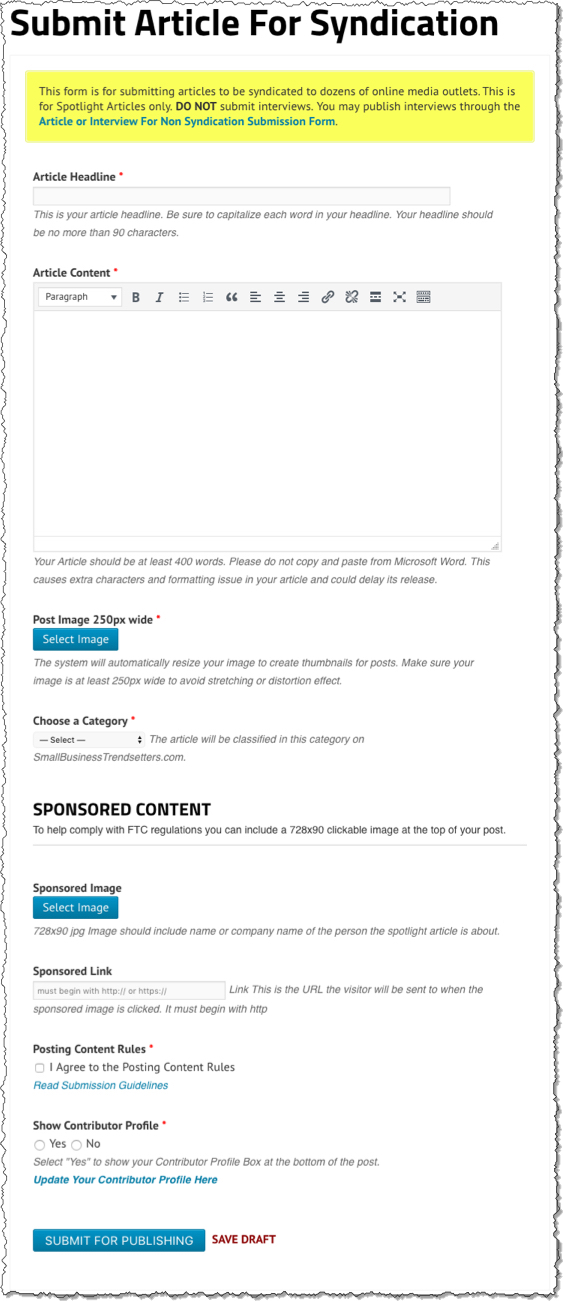
SBT Submit Article

  • Article Headline – Should be no more than 90 characters.
  • Article Content – Enter the body of the article here. If you include links within the body, be sure to use the correct URL. Article should be at least 400 words.
  • Post Image – Upload an image to be included with your article. Not all syndicated sites accept the images.
  • Categories – Select up to two categories to classify your article on SmallBusinessTrendsetters.com. The category information may or may not be used by the sites on which the article is syndicated to.
  • SPONSORED CONTENT – To help comply with FTC regulations you can include a 728×90 clickable image at the top of your post. See Complying & Profiting from FTC Disclosure Guidelines for more information
  • Sponsored Image – 728×90 jpg Image should include name or company name of the person the spotlight article is about.
  • Sponsored Link – Link This is the URL the visitor will be sent to when the sponsored image is clicked. It must begin with http
  • Posting Content Rules – Check to indicate you agree with the Posting Content Rules and have read the Submission Guidelines
  • Show Contributor Profile – Select “Yes” to show your Contributor Profile Box at the bottom of the post. Select “No” to omit the Contributor Profile from this article.
  • Save Draft – Always save your Article as a Draft so you can Preview the article before submitting
  • Submit for Publishing – Alerts the Editor that your Article is ready to be published and syndicated

Reports

Once you submit an article, it will appear in your Agency Dashboard with the status of Pending Review. No edits can be made while the article is Pending Review.

The Editor will review the article within 24 hours (M-F, 8:00 am – 5:00 pm, excluding US holidays). Once approved, the status of your release will show as Published.

The Media Distribution Report will be generated and added to your Agency Dashboard within 24-36 hours after syndication.

Each report allows you the option to save as a PDF to send to your clients. See Understanding Syndication, Using Media Logos, and Adding Custom SBT Report Logo for more information.

Article Retention

All Articles and Interviews added to SmallBusinessTrendsetters.com will remain on the site indefinitely (unless you choose to Delete your article or interview). If you cancel your membership to Authority Agency, your articles and interviews will remain on the site.

How to Submit Non-Syndicated Articles and Interviews
Login to Small Business Trendsetters at https://smallbusinesstrendsetters.com/login to submit a Syndicated Article, Non-Syndicated Article or Interview, or a Photo Spotlight from your Contributor Dashboard. If you do not know your login information, please contact the support desk at support@authorityagency.com

Submitting Articles/Interviews for Non-Syndication

These articles/interviews are not syndicated, and no distribution report will be available. You may embed a YouTube video in a non-syndicated article/interview.
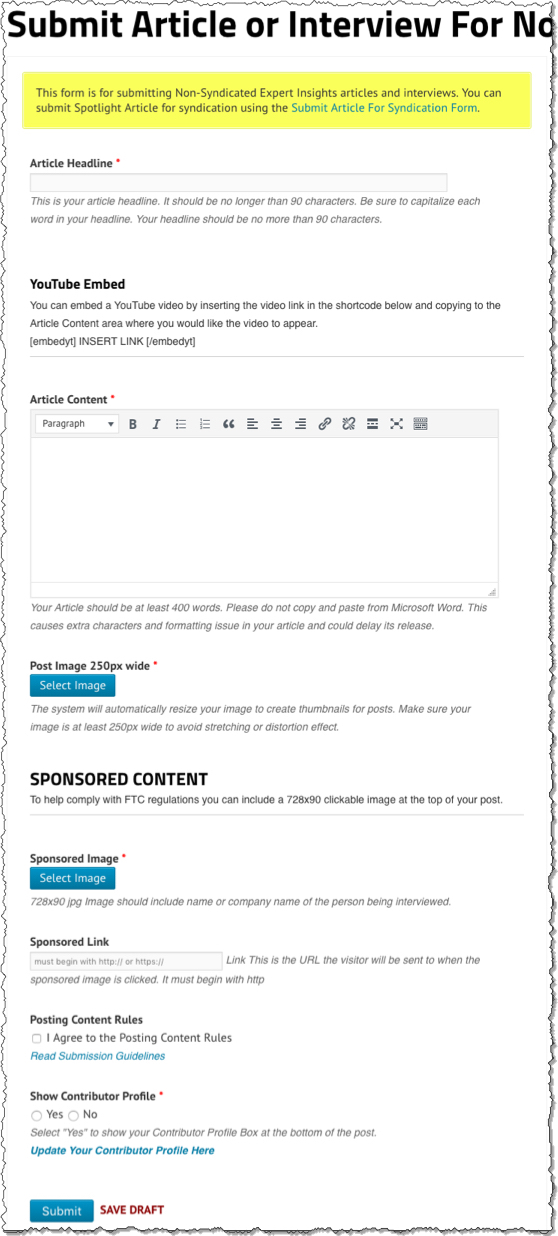
SBT Submit Interview

ARTICLE/INTERVIEW

  • Article Headline – Should be no more than 90 characters.
  • Article Content – Enter the body of the article here. If you include links within the body, be sure to use the correct URL.
  • YouTube Embed – You can embed a YouTube video by inserting the video link in the shortcode below and copying to the Article Content area where you would like the video to appear.
    [embedyt] INSERT LINK [/embedyt]
  • Post Image – Upload an image to be included with your article. Not all syndicated sites accept the images.
  • Categories – Select up to two categories to classify your article on SmallBusinessTrendsetters.com. The category information may or may not be used by the sites on which the article is syndicated to.
  • SPONSORED CONTENT – To help comply with FTC regulations you can include a 728×90 clickable image at the top of your post. See Complying & Profiting from FTC Disclosure Guidelines for more information
  • Sponsored Image – 728×90 jpg Image should include name or company name of the person the spotlight article is about.
  • Sponsored Link – Link This is the URL the visitor will be sent to when the sponsored image is clicked. It must begin with http
  • Show Contributor Profile – Select “Yes” to show your Contributor Profile Box at the bottom of the post. Select “No” to omit the Contributor Profile from this article.
  • Posting Content Rules – Check to indicate you agree with the Posting Content Rules and have read the Submission Guidelines
  • Save Draft – Always save your Article as a Draft so you can Preview the article before submitting
  • Submit – Alerts the Editor that your Article is ready to be published

Article Retention

All Articles and Interviews added to SmallBusinessTrendsetters.com will remain on the site indefinitely (unless you choose to Delete your article or interview). If you cancel your membership to Authority Agency, your articles and interviews will remain on the site.
How to Submit a Photo Spotlight
Login to Small Business Trendsetters at https://smallbusinesstrendsetters.com/login to submit a Photo Spotlight from your Contributor Dashboard. If you do not know your login information, please contact the support desk at support@authorityagency.com

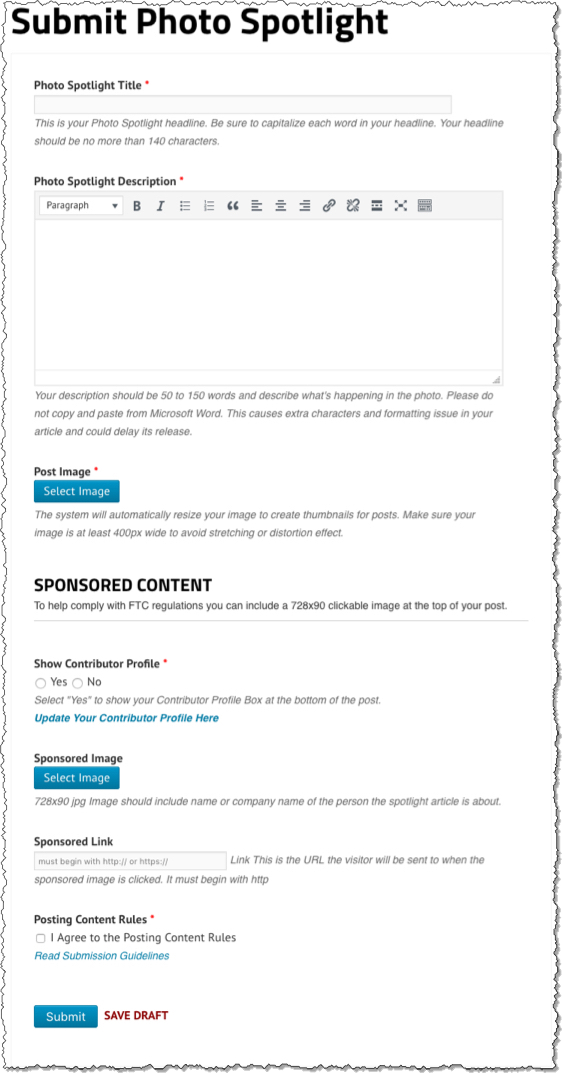
Submit Photo Spotlight

  • Photo Spotlight Title – This is your Photo Spotlight headline. Be sure to capitalize each word in your title. Your title should be no more than 140 characters.
  • Photo Spotlight Description – Your description should be 50 to 150 words and describe what’s happening in the photo. Please do not copy and paste from Microsoft Word. This causes extra characters and formatting issue in your article and could delay its release.
  • Post Image – The system will automatically resize your image to create thumbnails for posts. Make sure your image is at least 400px wide to avoid stretching or distortion effect.
  • Show Contributor Profile – Select “Yes” to show your Contributor Profile Box at the bottom of the post. Select “No” to omit the Contributor Profile from this article.
  • SPONSORED CONTENT – To help comply with FTC regulations you can include a 728×90 clickable image at the top of your post. See Complying & Profiting from FTC Disclosure Guidelines for more information
  • Sponsored Image – 728×90 jpg Image should include name or company name of the person the spotlight article is about.
  • Sponsored Link – Link This is the URL the visitor will be sent to when the sponsored image is clicked. It must begin with http
  • Posting Content Rules – Check to indicate you agree with the Posting Content Rules and have read the Submission Guidelines
  • Save Draft – Always save your Article as a Draft so you can Preview the article before submitting
  • Submit for Publishing – Alerts the Editor that your Article is ready to be published and syndicated

Article Retention

All Photo Spotlights added to SmallBusinessTrendsetters.com will remain on the site indefinitely (unless you choose to Delete your article or interview). If you cancel your membership to Authority Agency, your Photo Spotlights will remain on the site.
How to Add Sponsored Images to Your Posts
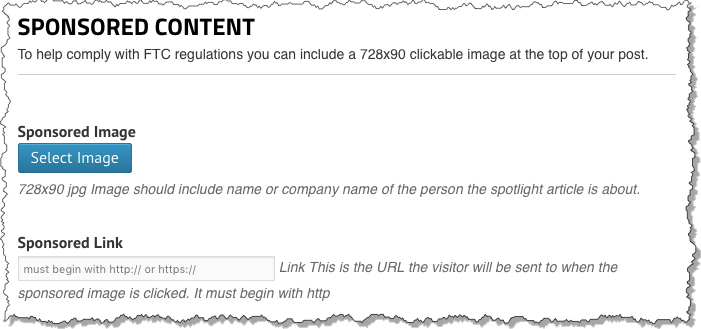
The Sponsored Content section will be at the bottom of your article/interview submission forms. This section is OPTIONAL.

Sponsored Images
Sponsored Image – 728×90 jpg Image should include name or company name of the person the spotlight article is about. (Canva.com Banner Graphics Maker)
Sponsored Link – This is the URL the visitor will be sent to when the sponsored image is clicked. It must begin with http

When do I need to make the disclosures?

  • Interview a client about their book.
  • Write and article about a client about their business.
  • Anytime you publish content about a client or company who is paying you.
  • If they are just prospects and not paying clients, this PROBABLY doesn’t apply.
  • If you got a free copy of their book, they want you to say that.

Resources

  • Complying & Profiting From FTC Disclosure Guidelines Webinar
  • FTC Endorsement Guide
  • Canva.com Banner Graphics Maker
How To Setup or Edit Your Contributor Profile
Your can choose to include or exclude your Contributor Profile on individual posts. This information will also be used to complete your Press Badge. Only one Contributor Profile per login is permitted.

From the Contributor Dashboard on SmallBusinessTrendsetters.com, select the Contributor Profile link:
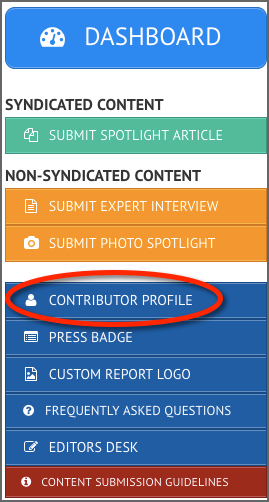
SBT Contributor ProfileFrom here you will be able to update your Contributor Profile with the following information:

First Name and Last Name
List your name exactly as you want it to appear on your articles or Press Badge.

Bio
This should position you as a Contributing Writer, Journalist, Independent Publisher etc.. Avoid framing yourself as an Authority Marketing Professional for this short Bio.

Example: Jack Mize is a Best Selling Author, host of Business Innovators Radio and contributor to Small Business Trendsetters and Business Innovators Magazine covering Influencers, Innovators and Trendsetters in Business, Health, Finance and Personal Development.

Contributor Image
Upload a headshot at least 250×250. Do not use images with Media Logos or text. Just your headshot.
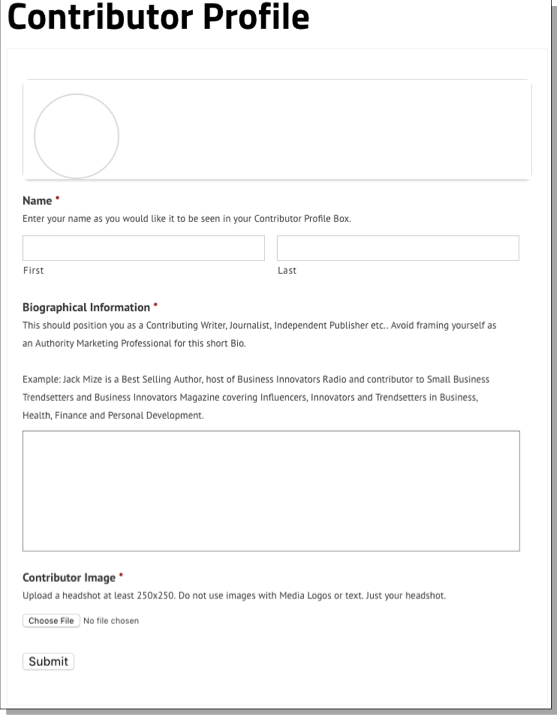
SBT Contributor Profile Submit
Once you hit Submit, your information will be saved and you can Preview your Contributor Profile at the top of the screen:
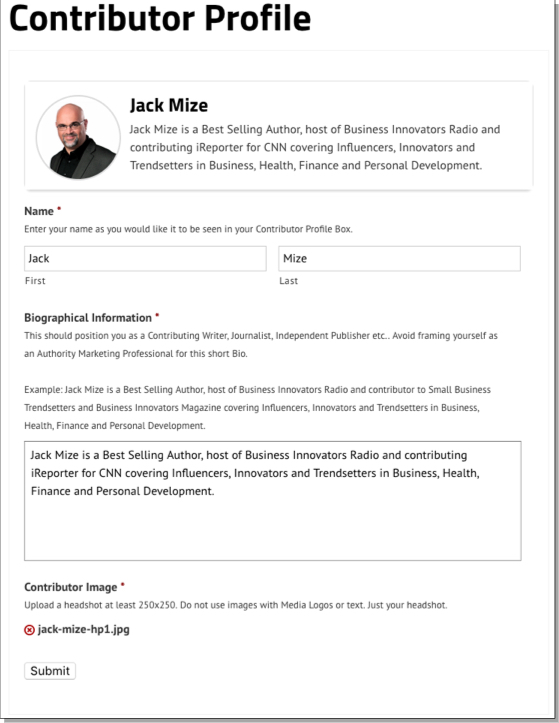
SBT Contributor Profile Complete

You can update the information from your Contributor Profile at any time.

How to Print a Press Badge
To print your SBT Press Badge, you must be have already completed your SBT Contributor Profile.

Select Press Badge from the menu on your Contributor Dashboard
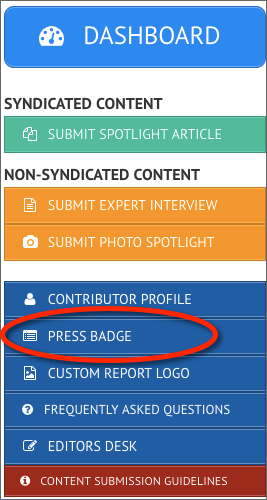
SBT Press Badge Menu

Your Press Badge will include your Name and Image entered in your Contributor Profile. The expiration date will be six months from the date printed. Badges can be printed and inserted into a 4×3 badge holder. Click here for an example.
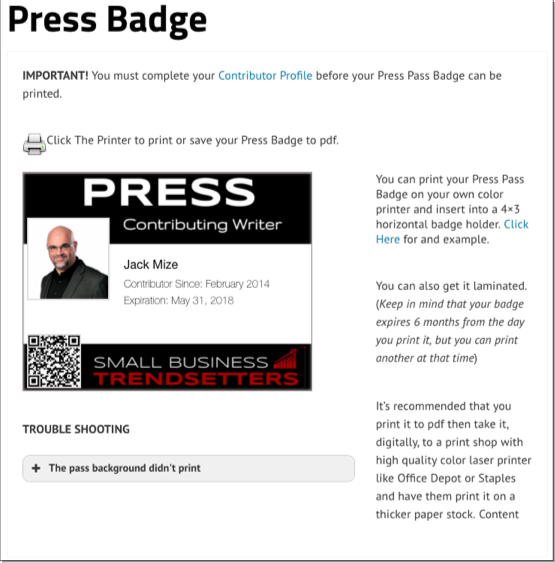
SBT Press Badge

Troubleshooting

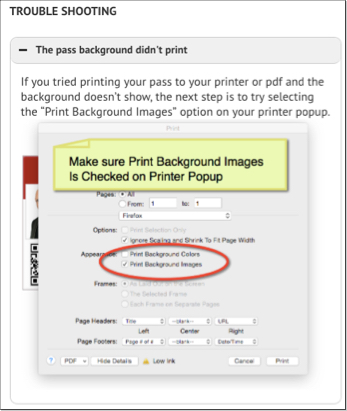
SBT Press Badge Troubleshooting

Understanding the SBT Media Distribution Report
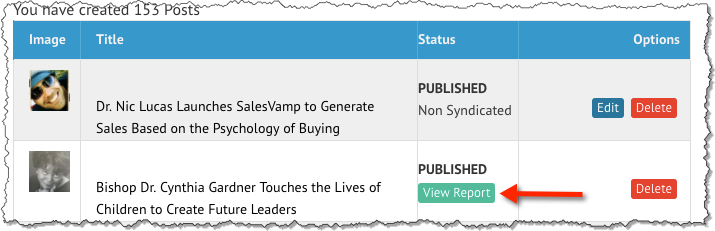
From your SBT Contributor Dashboard, you will see a list of all articles, interviews, and spotlight photos submitted by your account. Once a syndicated article has been syndicated and the report is available, you will see the option to View Report next to the article title.

SBT - Dashboard Report

Your Media Report will include a button to allow you to download a PDF, the Title of your Article, as well as links to all media outlets to which the article was syndicated.

SBT - Authority Media Report

Click on the Download PDF button to save the report as a PDF.
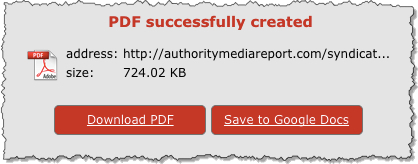
SBT - PDF Report Download

How to Add Custom Report Logos
Custom Report Logo
Media Distribution reports for all syndicated articles submitted to SmallBusinessTrendsetters.com will have the default Authority Media Report logo.SBT Select Custom Report Logo

Upload your Logo Header in the form of jpg, png, gif. Logo will appear as the actual size you upload. We suggest maximum width 750px and maximum height of 150px If you choose not to upload a logo the default Authority Media Report logo will be used.

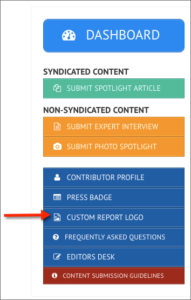
Select “Custom Report Logo” from the SBT Contributor Dashboard

Click Choose File and Select the file from your computer. Then, click Upload
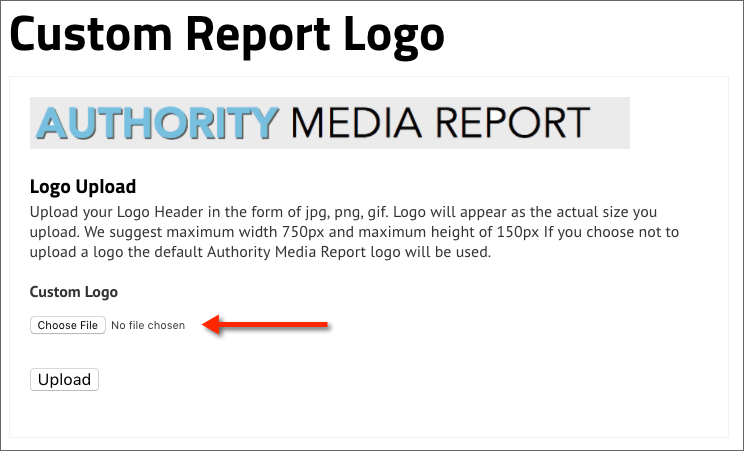
SBT Custom Report Logo

After your logo is uploaded, you will be directed to a screen confirming the change has been made.

To change the Custom Logo, select “Custom Report Logo” from the SBT Contributor Dashboard. Remove the current logo by clicking the red “x” next to the filename. Then, upload a new custom logo for your account.
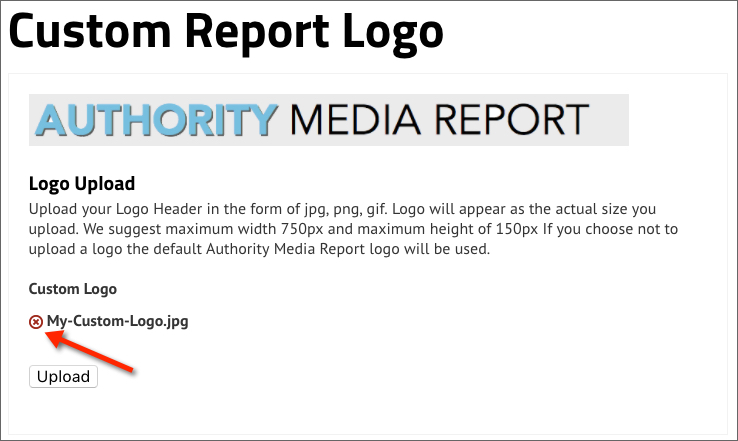
You can only have one custom logo per membership.

Frequently Asked Questions
Q: How long does it take to get an article on SmallBusinessTrendsetters.com to be syndicated?

A: Articles submitted for syndication are reviewed within 24 hours on Mondays through Fridays, excluding holidays. If the article is rejected you will be notified of the needed revisions. If the article is approved it will be submitted and a distribution report will be ready within 24 hours.

Q: Where will my article be displayed?

A: We provide you with a detailed report with live links on hundreds of newspaper, radio, and TV news websites

Q: How long will my article be available online?

A: There are no guarantees as to how long your article will be available on any specific media site in our syndication network.

We’ve found that articles are generally available for at least 30 days, and 60 days to a year is not unusual, however each news aggregator sets its own schedule for purging releases from their system. Your article will remain on SmallBusinessTrendsetters.com indefinitely.

Q: Why doesn’t my distribution report include every site that has published my article?

A: Many websites republish our articles directly from our RSS feeds as well as the sites in our distribution network. Only the media outlets that participate in our tracking system are included in the report.

Q: Can I display media logos on my web site once after the release is published by the media site?

A: Each media outlet has it’s own terms of service regarding usage of trademarks and images, including logos. While it is a common practice to use media outlet logos with statements like “as seen on” “as quoted on” etc, since we don’t hold the rights to the images, we are not authorized to grant permission to use the actual logo images on your site or in your marketing.

ADDITIONAL RESOURCES
10 Minute Interview Preparation Using Online FAQs

10-Minute Interview Preparation Using Online FAQs


ACCESS TRAINING
MAGAZINE COVER TEMPLATES

Magazine Cover Templates


ACCESS TRAINING
Magazine Cover Wizard

Magazine Cover Wizard


ACCESS TRAINING
Understanding-News-Syndication

Understanding News Syndication


ACCESS TRAINING
Alternatives to "Expert Stated" in Articles and News Releases

Alternatives to “Expert Stated” in Articles and News Releases


ACCESS TRAINING
Punctuation Rules When Using Quotes

Punctuation Rules For Quotes


ACCESS TRAINING
SBT Walk In Flyers

SBT Walk In Flyers


ACCESS TRAINING
MEMBER DASHBOARD
  • Dashboard Home
  • Authority PressWire
  • Small Business Trendsetters
  • Business Innovators Magazine
  • Marketing Insiders
  • Local Marketing Trendsetters Chapter Submission
  • Expert Profiles Chapter Submission
  • Business Innovators Radio
  • Agency Training & Workshops
AUTHORITY PLAYBOOK MENU
  • 60 Minute Authority Platform
  • Multi-Author Interview Book Models
  • Multi-Author Monetized Recognition / Charity Model
  • If I Had To Make $500 By Next Week Kindle Publishing
  • Working With Already Published Authors
  • Selling Authority – Pricing & Framing
  • Selling Without Selling with Tips Book
  • Free + Shipping Book Funnel
Login To SBT Contributor Dashboard

Copyright © 2026 AuthorityAgency.com · Log in ·