MEMBER DASHBOARD - AUTHORITY AGENCY

  • DASHBOARD
  • TRAINING & WORKSHOPS
  • TOOLS & TEMPLATES
  • PLR LIBRARY
  • AGENT SPOTLIGHTS
  • BONUS TACTICS
  • BLACK LABEL AUTHORITY

How To Add More Than 10 Authors To Kindle Listing

By default, the KDP account allows you to list 10 contributors and their titles. To include additional authors for books with multiple authors:

  1. Add the first 10 authors as contributors
  2. Publish the book
  3. Once published, Amazon assigns an ASIN number to the book
  4. Contact KDP Support

Option 1: Email KDP support – kdp-support@amazon.com (must be done from the email address associated with the KDP Account) with the request provided below.
Option 2: Login to the KDP account where the book is published.

  1. Select Help from top menu
  2. Select Book Details from side menu
  3. Select Changing Book Details from submenu
  4. Enter the request information provided below
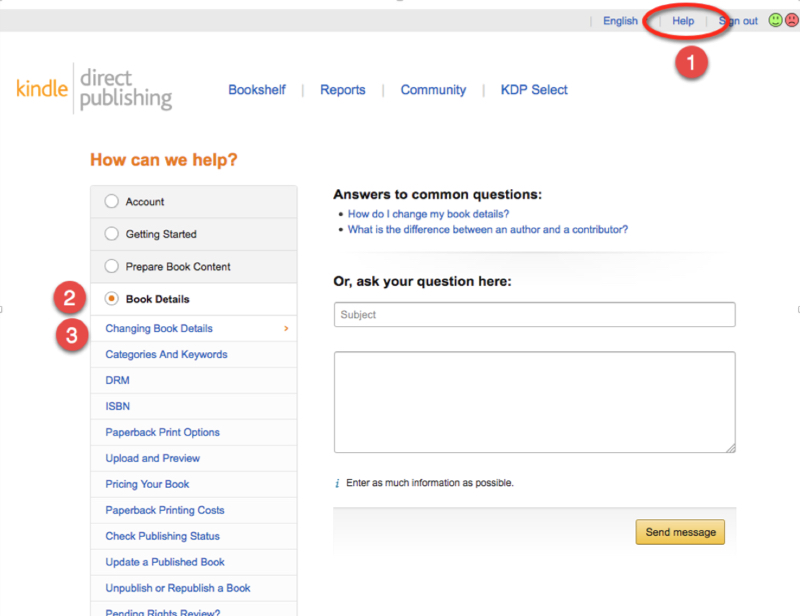
Add More Than 10 Authors
Subject: Request To Add Contributors
I would like to request to have the following Authors added to the title “[BOOK TITLE]” with ASIN: [asin#].

These are listed as First Name Last Name

Author Name
Author Name
Author Name
Author Name
Author Name

Your additional authors should appear within 24-72 hours.

MEMBER DASHBOARD
  • Dashboard Home
  • Authority PressWire
  • Small Business Trendsetters
  • Business Innovators Magazine
  • Marketing Insiders
  • Local Marketing Trendsetters Chapter Submission
  • Expert Profiles Chapter Submission
  • Business Innovators Radio
  • Agency Training & Workshops
AUTHORITY PLAYBOOK MENU
  • 60 Minute Authority Platform
  • Multi-Author Interview Book Models
  • Multi-Author Monetized Recognition / Charity Model
  • If I Had To Make $500 By Next Week Kindle Publishing
  • Working With Already Published Authors
  • Selling Authority – Pricing & Framing
  • Selling Without Selling with Tips Book
  • Free + Shipping Book Funnel

Copyright © 2026 AuthorityAgency.com · Log in ·